|
 |
|
|
|

RZ DVD Creator - Convert any movies and photos to Video DVD to play well on DVD player, such as convert AVI to DVD, MP4 to DVD, WMV to DVD, MPEG to DVD, Mkv, YouTube, Ogv, Quicktime, MOV, MTS, RM, RMVB, Jpeg, PNG, BMP, etc, to DVD.
For example: you have two avi movies, "[Heros][XVID].avi" and "Starcraft2[divx5].avi", you want to convert these avi movies to DVD to play well on DVD player with full screen TV, what is the best way?
The Best answer is using RZ DVD Creator to convert these avi movies to video DVD that can be played well on DVD player.
Step 1: Run RZ DVD Creator, click "Add button " to add all avi movies "[Heros][XVID].avi" and "Starcraft2[divx5].avi" into program, or directly drag and drop these avi movies into RZ DVD Creator. " to add all avi movies "[Heros][XVID].avi" and "Starcraft2[divx5].avi" into program, or directly drag and drop these avi movies into RZ DVD Creator.
Step 2: Most regular DVD player only recognize the standard video DVD, so if you want to play the converted DVD on regular DVD player, you should select "DVD - NTSC", or "DVD - PAL" to convert all avi movies to standard video DVD.
| |
Both NTSC and PAL are TV system, NTSC is the TV system used in North America and most of South America, PAL is the TV system mostly used Europe. |
| |
If your DVD player support Divx(Divx certified DVD player), you also can convert these avi movies to Divx AVI movies, you can select "Divx-DVD-NTSC" or "Divx-DVD-PAL" as target. You can set the higher video resolution than stanard video DVD when convert to Divx AVI movies, but it only be played on Divx/MPEG4 Certificate DVD Player |
| |
If your DVD player support Xvid(Xvid certified DVD player), you also can convert these avi movies to Xvid AVI movies, you should select "Xvid-DVD-NTSC" or "Xvid-DVD-PAL" as target. You can set the higher video resolution than stanard video DVD when convert to Xvid AVI movies, but it only be played on Xvid/MPEG4 Certificate DVD Player. |
| |
At last you should note: you cann't add DVD menu in Divx/Xvid AVI DVD. |
Step 3:Select a target folder which the converted video DVD will be saved to, you can directly select a DVD burner drive as target, RZ DVD Creator will directly burn the converted video DVD on inserted DVD disc(support any DVD disc, like dvd-r, dvd+r, dvd-rw, dvd+rw, dvd+r dl, dvd-r dl, etc.)
Step 4: Click "START button " to start convert avi to DVD. " to start convert avi to DVD.
Tips:
Tips 1: Here you can play and view the source avi movies, and you can define the start point(Start Time) and end point(End Time) of the source avi movies, only the part during the start and end point will be converted/burned. Burn the most favorite part within avi movie to DVD.
Tips 2: Here you can preview the total size of the target DVD, you should keep it less than 100%, when you want to fit/burn large/long avi movies onto one DVD, or fit/burn multiple avi movies onto one DVD, RZ DVD Creator can auto compress the movies to fit the disc size.
Tips 3: Here we offer some advanced setting for the target video, such as TV system(NTSC/PAL), the Width and the Height of output video, Video aspect ratio, Video resize mode, Video/audio Quality/Bitrate, etc.
Tips 4: You can click Subtitle button to add SRT subtile file on selected avi movie. to add SRT subtile file on selected avi movie.
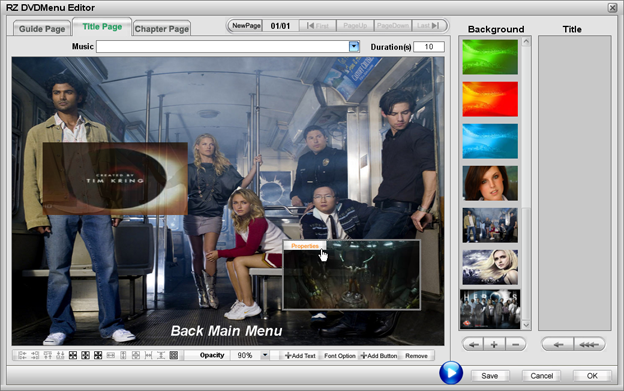
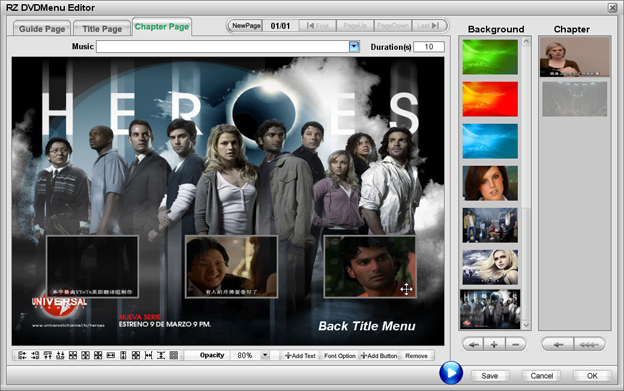
Tips 5: You can click "Menu button " to custome the professional DVD menu, and check "Enable DVD menu " to custome the professional DVD menu, and check "Enable DVD menu " to add DVD menu in target DVD. " to add DVD menu in target DVD.
Following are some DVD menu sample:
Guide Menu Page:
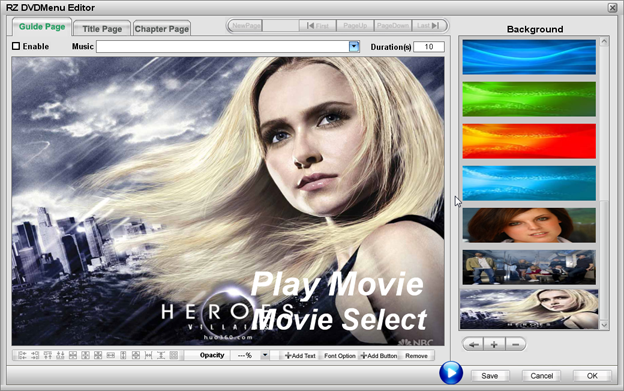
Title Menu Page:
Chapter Menu Page:
|
|
| Tags:avi to dvd, convert avi to dvd, avi to dvd converter,avi2dvd,avi 2 dvd,xvid to dvd,divx to dvd, |
|
| Keywords:avi,dvd,avi to dvd,avi to dvd converter,convert avi to dvd,avi 2 dvd,xvid to dvd,divx to dvd, |
|
| Define:What is AVI To DVD? |
|
|
 |
|
|
|
|


 Convert any format movies or photos to DVD!