|
|
RZ DVD Creator User Guides - Create/Design DVD Title Menu!
|
|
|
With RZ DVD Creator, you can easy to customize the professional DVD Title Menu!
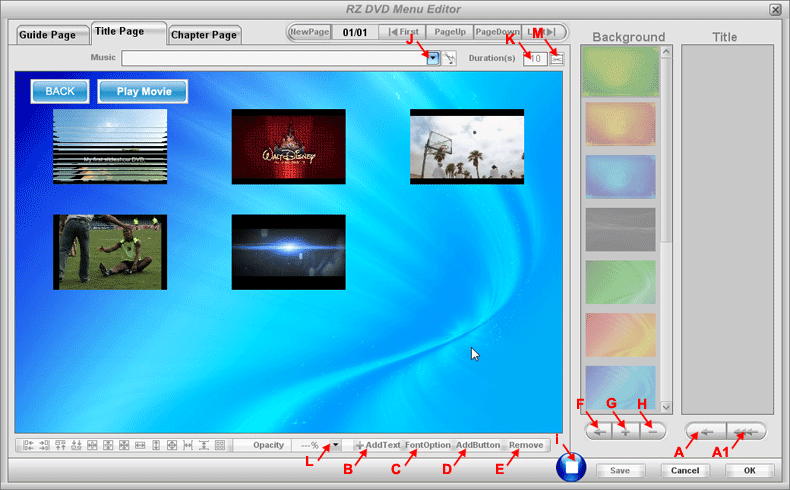
Run RZ DVD Creator and click button add source video files, then click button add source video files, then click button , you can view following dialog, here you can easy Design/Create the professional DVD Title menu. , you can view following dialog, here you can easy Design/Create the professional DVD Title menu.
STEP 1.) First select . .
STEP 2.) Click "(G)  " to add Still Images or Videos into the background list, then double-click the thumbnail in the background list, or select a thumbnail and click "(F) " to add Still Images or Videos into the background list, then double-click the thumbnail in the background list, or select a thumbnail and click "(F)  " to set the background of the current page. " to set the background of the current page.
STEP 3.) Double-click all the thumbnails in the Title list to add all title buttons on the page,
or select the thumbnail in the Title list then click "(A)  " to add title button on the page, " to add title button on the page,
or click "(A1)  " to auto add all titles button on the page. " to auto add all titles button on the page.
(When you play DVD Title menu, you can click these title buttons to directly jump to corresponding DVD title movie)
STEP 4.) When finished, please click "OK " to save and quit this dialog. " to save and quit this dialog.
Tips: )
1.) Maximum Title buttons per page is 9, if you have more than 9 Tiltes, you you can click "NewPage " to add new menu page. " to add new menu page.
2.) Click Title button, you will view a "Properties button " display on the top left corner of the Title button, click it, you can set the properties of the Title button, such as Add text, Add background, Set start point, etc. " display on the top left corner of the Title button, click it, you can set the properties of the Title button, such as Add text, Add background, Set start point, etc.
3.) You can click "(I)  ", to preview current menu page. ", to preview current menu page.
4.) You can click "(B) Add Text  " to add text on the current page. " to add text on the current page.
5.) You can click "(C) Font Option  " to set the font size, font type, font color, etc. " to set the font size, font type, font color, etc.
6.) You can click "(E) Remove  " to remove the selected button on the current page. " to remove the selected button on the current page.
7.) You can click "(H)  " to delete the selected thumbnail from the background lisk. " to delete the selected thumbnail from the background lisk.
8.) You can click "(L)  " to set the opacity of the selected item on the current page. " to set the opacity of the selected item on the current page.
9.) Here you can select a music file as the background music of the current page.
"(J)  " "
10.) Here you can set the time duration of the current page, by default is 10s.
"(K)  " "
|
|
|
|