|
Users have a variety of options, here you can change some default config. The option dialog can be accessed by clicking the options button on the main interface of application. Following is The Option Dialog. on the main interface of application. Following is The Option Dialog.
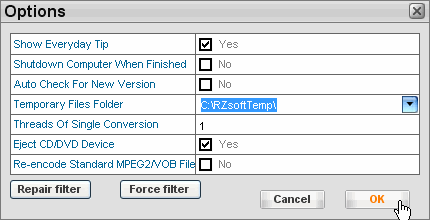
Temporary Files Folder: Drop-down click the "Temporary Files Folder" option to specifies the temp folder in your hard disk, the temporary files will be automatically deleted once process complete.
Please make sure the Temporary Files Folder have enough free space(Burn to DVD-5, >=9GB / Burn to DVD-9, >=18GB).
Show Everyday Tips? Checked to show everyday tips when RZ DVD Creator launch.
Shutdown Computer When finished. If you checked this option, once finish converting, your computer will be auto turned off.
Auto Check New Version. If you checked this option, once your launch the RZ DVD Creator, it will check the new version in our server automatically.
Threads Of Single Conversion . If you have stronger power CPU, you can set the more conversion threads to enhance the conversion speed.
Repair Filter. If you cann't add media files into RZ DVD Creator, you can try click "Repair Filter ", then try add media files again. ", then try add media files again.
Force Filter. After "Repair Filter", if you still cann't add media files into RZ DVD Creator, you can try click "Force Filter ", then try add media files again. ", then try add media files again.
|