RZ DVD Creator, the easiest way to watch internet media on TV! Convert/Burn video to DVD has never been easier!
Convert avi to DVD, Convert/Burn any movies and photos to DVD with professional DVD Menu! Best DVD Burner/Converter!
RZ Free Burner User Guides - Burn hard disk DVD folder to DVD writeable disc!
Burn hard disk DVD folder which includes VIDEO_TS and AUDIO_TS to DVD writeable disc(DVD-R, DVD-RW, DVD+R, DVD+RW, DVD-R DL, DVD+R DL, etc.).
Step 1: Insert writeable DVD disc, Select "Burn Video", you will see following dialog, Step 2: Click "Browse button" to select a hard disk DVD folder which includes VIDEO_TS and AUDIO_TS folder.(If you want to create/burn Video DVD from any videos, you should use RZ DVD Creator.).
Step 3: View the DVD folder Size, you should keep it less than your writeable DVD disc.
Step 4: Select a burn driver which you have inserted the writeable disc as target.

 ", you will see following dialog,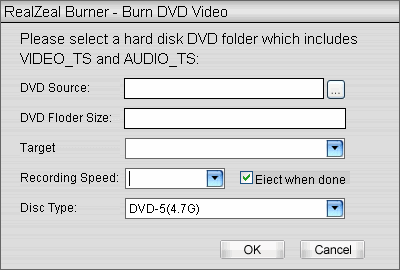
 " to select a hard disk DVD folder which includes VIDEO_TS and AUDIO_TS folder.(If you want to create/burn Video DVD from any videos, you should use RZ DVD Creator.).
 ", start burn.